
omp in the terminal is “good enough”. Sessions, tool calls, permission prompts — all doable in a terminal window.
But not good.
Want to revisit yesterday’s session? ls through a pile of JSONL. Compare three branches side by side? Open three terminal windows. Check whether MCP is hooked up? Dig through config files. Switch Git worktrees? Open another pane.
I didn’t want to replace omp. I wanted a desk: the sessions, terminals, files, and MCP status that already exist, laid out where I can see them.
ompweb’s positioning is on page one of the README: a modern, high-performance, local-first web workspace and native desktop app for oh-my-pi.
The key design is just one line — don’t rewrite the agent, just read its session files.
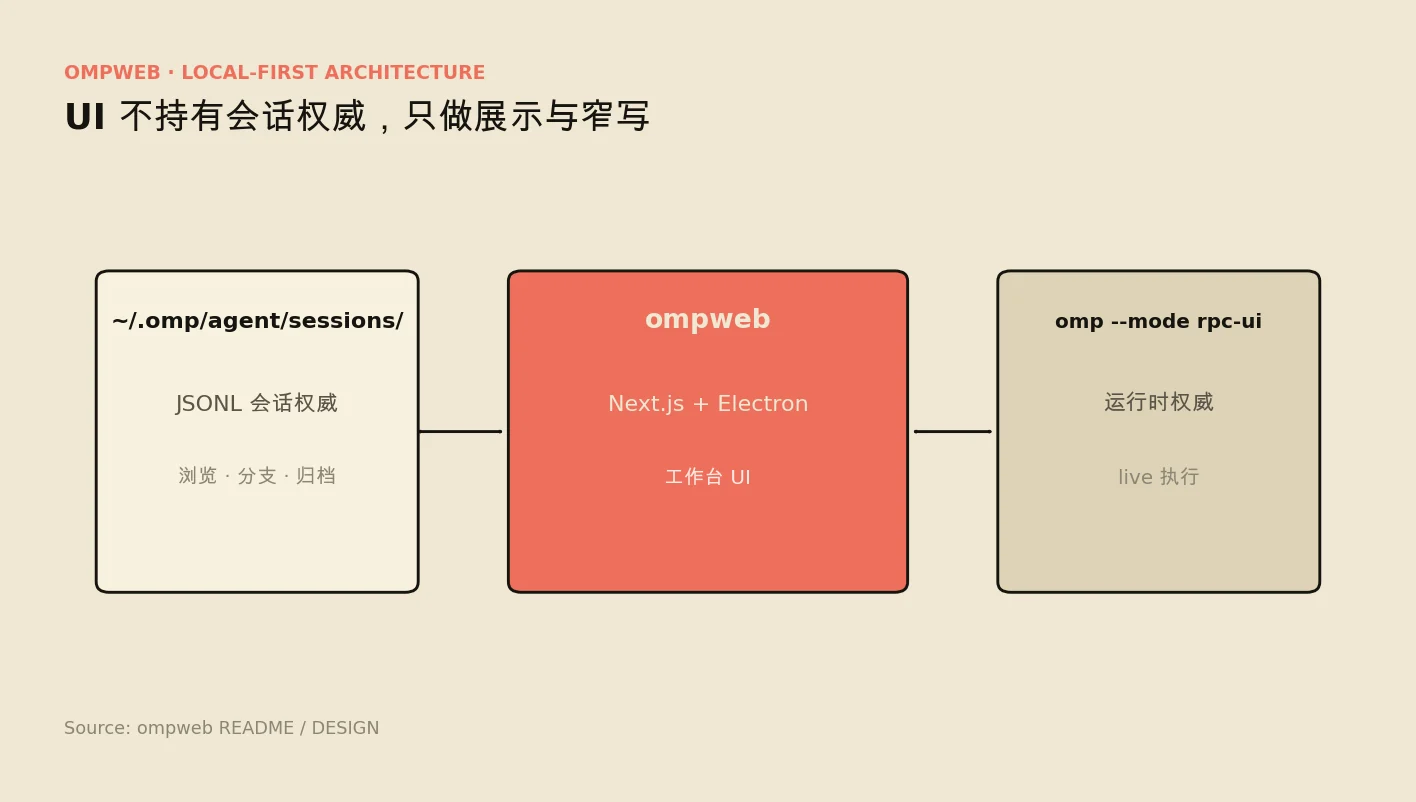
~/.omp/agent/sessions/   ← single source of truth for sessions
        ↓ browse / branch / archive (narrow writes)
     ompweb (Next.js / Electron)
        ↓ live execution
  omp --mode rpc-ui  ← OMP stays the runtime
Local sessions get scanned straight from JSONL by Node; live work goes through omp --mode rpc-ui (NDJSON over stdio). The OMP SDK lives on the Bun side — the Node service deliberately never imports it, to avoid mixing runtimes.
In one line: OMP writes sessions, ompweb displays and orchestrates; the UI holds no authority.
Problem
Terminals have three ceilings:
- History is invisible — sessions live in files, not in front of you
- Multi-window has no structure — branching, comparing, rolling back all depend on manual window juggling
- The ecosystem is invisible — MCP, skills, Git state scattered everywhere
Rewrite an agent and you split the ecosystem. ompweb chose to stand next to omp, not across from it.
Approach
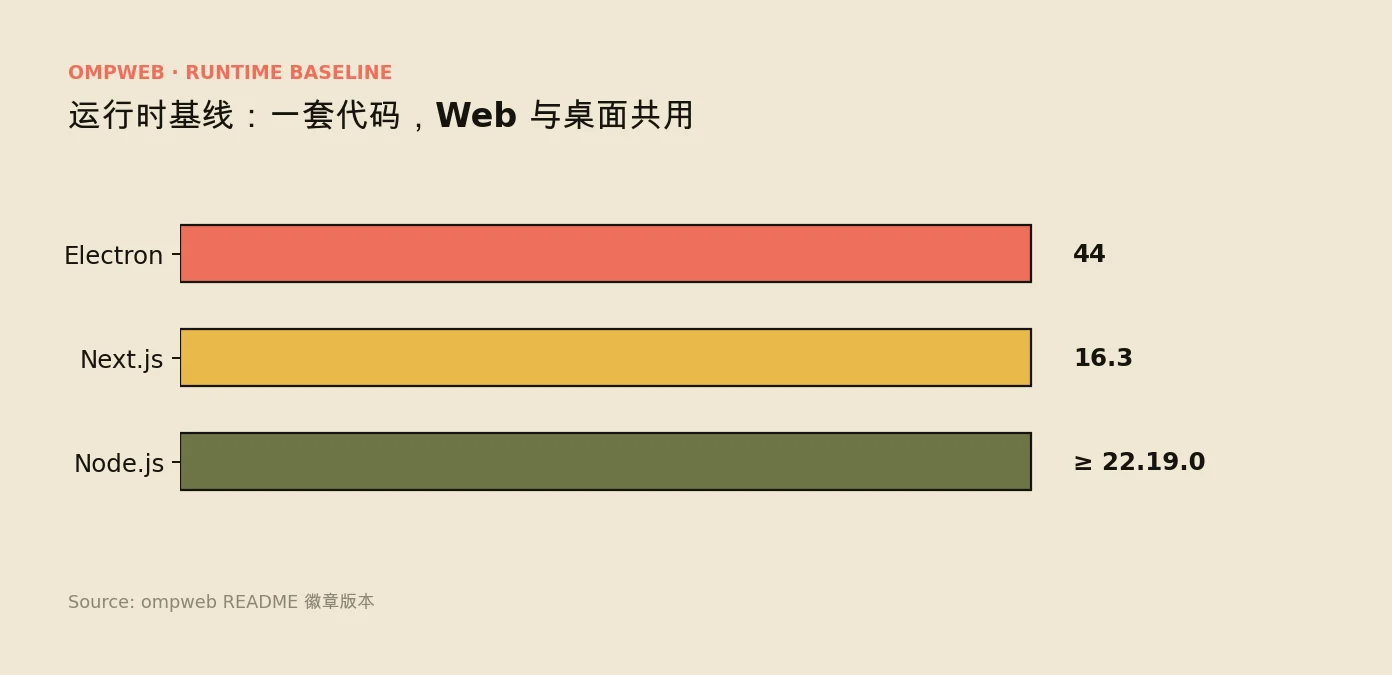
The stack is Next.js 16 + Electron 44, Node ≥ 22.19.
- Web:
npx @37chengshan/ompweb@latestopens it, listening on127.0.0.1:30177 - Desktop: Electron shell, tray-resident, Dock status, independent window lifecycle
- Remote-ready:
--password,--hostname,--no-open— built for servers
Later I added a Rust ompweb-host daemon: Git / PTY / session scanning / settings / supervisor, over bounded NDJSON (UDS / Named Pipe).
Features are laid out as a “workbench”, not a “chat window”:
- Session tree navigation and branching
- Real-time multi-agent collaboration
- Interactive web PTY
- Visual MCP / Skill management
- Code and rich-media preview
- Git multi-worktree switching
The boundary is clear. The write path is deliberately narrow. Session authority lives with OMP; ompweb keeps only low-risk operations like rename / archive / delete / branch-parent. Try to write everything and you’ll fight the live process.
Guard the SDK boundary. The OMP SDK is Bun-only; the Node/Next service can’t just import it for convenience. Work has to go through omp --mode rpc-ui.
The architecture gets thicker. After adding the host daemon, the debugging surface grows — UI, Next, host, omp, four layers. That’s the cost of local-first; docs and secure defaults (loopback / password) have to keep up.
Try it with one npx, or grab an installer from Releases (mac / Windows / Linux). MIT license; upstream lineage comes from the pi-web / oh-my-pi ecosystem.
It doesn’t invent a new agent — it just puts the omp sessions that already exist on a desk you can actually use.
npx @37chengshan/ompweb@latestMain repo: 37chengshan/ompweb.
FAQ
Is ompweb meant to replace omp?
No. The author is explicit: it’s not about replacing omp, it’s about wanting a “desk”. ompweb doesn’t rewrite the agent, it just reads its session files; live execution still goes through omp — standing next to omp, not across from it.
How does it read my sessions?
~/.omp/agent/sessions/ is the single source of truth: local history gets scanned from JSONL by Node, live work goes through omp --mode rpc-ui (NDJSON over stdio). In one line: OMP writes sessions, ompweb displays and orchestrates.
Is it safe to change sessions with it?
The write path is deliberately narrow — only low-risk operations like rename / archive / delete / branch-parent. Try to write everything and you’ll fight the live process — that’s a boundary the author set on purpose.
How do I run it? What do I need?
Web version, one line: npx @37chengshan/ompweb@latest, listening on 127.0.0.1:30177 by default; desktop installers too (mac / Windows / Linux). The stack is Next.js 16 + Electron 44, needs Node ≥ 22.19, MIT license.
Can I use it remotely on a server?
Yes — with --password, --hostname, --no-open flags, built for servers. Loopback only by default; the author notes that docs and secure defaults have to keep up.
终端里的 omp 其实「够用」。会话、工具调用、权限确认,都能在黑底白字里完成。
但不够「好用」。
想回看昨天的会话,只能 ls 一堆 JSONL。想同时开三个分支对比,只能开三个终端窗口。想看 MCP 有没有挂上,翻配置文件。想切 Git worktree,再开一个 pane。
我不是想换掉 omp。我是想要一张桌子:把已经存在的会话、终端、文件、MCP 状态摊开看。
ompweb 的定位写在 README 第一页:oh-my-pi 的现代化、高性能、本地优先的 Web 工作区与原生桌面应用。
关键设计只有一条——
不重写 Agent,只读它的会话文件。
~/.omp/agent/sessions/   ← 唯一会话权威
        ↓ 浏览 / 分支 / 归档(窄写)
     ompweb (Next.js / Electron)
        ↓ live 执行
  omp --mode rpc-ui  ← OMP 仍是 runtime
本地会话用 Node 直接扫 JSONL;live 工作走 omp --mode rpc-ui(stdio 上的 NDJSON)。OMP SDK 在 Bun 侧,Node 服务刻意不 import,避免把运行时搞混。
一句话:OMP 写会话,ompweb 展示和编排;权威不在 UI。
问题
终端有三个天花板:
- 历史不可视 —— 会话在文件里,不在眼前
- 多开无结构 —— 分支、对比、回滚靠人肉窗口管理
- 生态不可见 —— MCP、技能、Git 状态散落各处
如果重写一个 Agent,你就分裂了生态。ompweb 选择站在 omp 旁边,而不是对面。
做法
技术栈是 Next.js 16 + Electron 44,Node ≥ 22.19。
- Web:
npx @37chengshan/ompweb@latest即开,监听127.0.0.1:30177 - 桌面:Electron 壳,托盘常驻、Dock 状态、独立窗口生命周期
- 远端可控:
--password、--hostname、--no-open,适合服务器后台
后面又加了一层 Rust ompweb-host 守护进程:Git / PTY / 会话扫描 / 设置 / supervisor,走有界 NDJSON(UDS / Named Pipe)。
功能面按「工作台」而不是「聊天窗」来铺:
- 会话树导航与分支
- 实时多 Agent 协同
- 交互式 Web PTY
- 可视化 MCP / Skill 管理
- 代码与富媒体预览
- Git 多 worktree 切换
边界很清楚。写路径要故意窄。 会话权威在 OMP;ompweb 只保留 rename / archive / delete / branch-parent 这类低风险操作。什么都想写,就会和 live 进程打架。
SDK 边界要守住。 OMP SDK 是 Bun-only,Node/Next 服务不能图省事直接 import。活儿必须走 omp --mode rpc-ui。
架构会变厚。 加 host daemon 之后调试面变大——UI、Next、host、omp 四层。这是 local-first 的代价,文档和默认安全(loopback / 密码)必须跟上。
可 npx 一键体验,也有 Releases 安装包(mac / Windows / Linux)。MIT 许可,上游脉络来自 pi-web / oh-my-pi 生态。
它没有发明新 Agent,只是把已经存在的 omp 会话,放到了一张你真的能用的桌子上。
npx @37chengshan/ompweb@latest主仓库:37chengshan/ompweb。
常见问题
ompweb 是要替代 omp 吗?
不是。作者明确说不是想换掉 omp,而是想要一张”桌子”。ompweb 不重写 Agent,只读它的会话文件;live 执行仍然走 omp,站在 omp 旁边而不是对面。
它怎么读到我的会话的?
~/.omp/agent/sessions/ 是唯一会话权威:本地历史用 Node 直接扫 JSONL,live 工作走 omp --mode rpc-ui(stdio 上的 NDJSON)。一句话:OMP 写会话,ompweb 展示和编排。
用它改会话内容安全吗?
写路径被故意做得很窄,只保留 rename / archive / delete / branch-parent 这类低风险操作。什么都想写,就会和 live 进程打架——这是作者有意设的边界。
怎么跑起来?要什么环境?
Web 版一行命令:npx @37chengshan/ompweb@latest,默认监听 127.0.0.1:30177;也有桌面安装包(mac / Windows / Linux)。技术栈是 Next.js 16 + Electron 44,要求 Node ≥ 22.19,MIT 许可。
能在服务器上远程用吗?
可以,有 --password、--hostname、--no-open 参数,适合服务器后台。默认只走 loopback,作者提醒文档和默认安全必须跟上。